Extract LFPs
Understanding filtering artifacts and chunking when extracting LFPs
Local Field Potentials (LFPs) are low-frequency signals (<300 Hz) that reflect the summed activity of many neurons. Extracting LFPs from high-sampling-rate recordings requires bandpass filtering, but this can introduce artifacts when not done carefully, especially when data is processed in chunks (for memory efficiency).
This tutorial demonstrates: 1. How to generate simulated LFP data 2. Common pitfalls when filtering with low cutoff frequencies 3. How chunking and margins affect filtering artifacts 4. Summary
Key takeaway: For LFP extraction, use large chunks (30-60s) and large margins (several seconds) to minimize edge artifacts, even though this is less memory-efficient.
import time
import numpy as np
import matplotlib.pyplot as plt
from pathlib import Path
import pandas as pd
import seaborn as sns

import spikeinterface as si
import spikeinterface.extractors as se
import spikeinterface.preprocessing as spre
import spikeinterface.widgets as sw
from spikeinterface.core import generate_ground_truth_recording
%matplotlib inline
1. Generate simulated recording with low-frequency signals
Let’s create a simulated recording and add some low-frequency sinusoids that mimic LFP activity.
# Generate a ground truth recording with spikes
# Use a higher sampling rate (30 kHz) to simulate raw neural data
recording, sorting = generate_ground_truth_recording(
    durations=[300.0],  # 300 s
    sampling_frequency=30000.0,
    num_channels=1,
    num_units=4,
    seed=2305,
)

print(f"Recording: {recording}")
print(f"Duration: {recording.get_total_duration():.1f} s")
print(f"Sampling frequency: {recording.sampling_frequency} Hz")
print(f"Number of channels: {recording.get_num_channels()}")
Recording: GroundTruthRecording (InjectTemplatesRecording): 1 channels - 30.0kHz - 1 segments
                      9,000,000 samples - 300.00s (5.00 minutes) - float32 dtype - 34.33 MiB
Duration: 300.0 s
Sampling frequency: 30000.0 Hz
Number of channels: 1
Now let’s add some low-frequency sinusoidal components to simulate LFP signals
# Add low-frequency sinusoids with different frequencies and phases per channel
np.random.seed(2305)
num_channels = recording.get_num_channels()
lfp_signals = np.zeros((recording.get_num_samples(), recording.get_num_channels()))
time_vector = recording.get_times()

for ch in range(num_channels):
    # Add multiple frequency components (theta, alpha, beta ranges)
    # Theta-like: 4-8 Hz
    freq_theta = 4 + np.random.rand() * 4
    phase_theta = np.random.rand() * 2 * np.pi
    amp_theta = 50 + np.random.rand() * 50

    # Alpha-like: 8-12 Hz
    freq_alpha = 8 + np.random.rand() * 4
    phase_alpha = np.random.rand() * 2 * np.pi
    amp_alpha = 30 + np.random.rand() * 30

    # Beta-like: 12-30 Hz
    freq_beta = 12 + np.random.rand() * 18
    phase_beta = np.random.rand() * 2 * np.pi
    amp_beta = 20 + np.random.rand() * 20

    lfp_signals[:, ch] = (
        amp_theta * np.sin(2 * np.pi * freq_theta * time_vector + phase_theta) +
        amp_alpha * np.sin(2 * np.pi * freq_alpha * time_vector + phase_alpha) +
        amp_beta * np.sin(2 * np.pi * freq_beta * time_vector + phase_beta)
    )

# Create a recording with the added LFP signals
recording_lfp = si.NumpyRecording(traces_list=[lfp_signals], sampling_frequency=recording.sampling_frequency,
                                  channel_ids=recording.channel_ids)
recording_with_lfp = recording + recording_lfp

print("Added low-frequency components to simulate LFP signals")
Added low-frequency components to simulate LFP signals
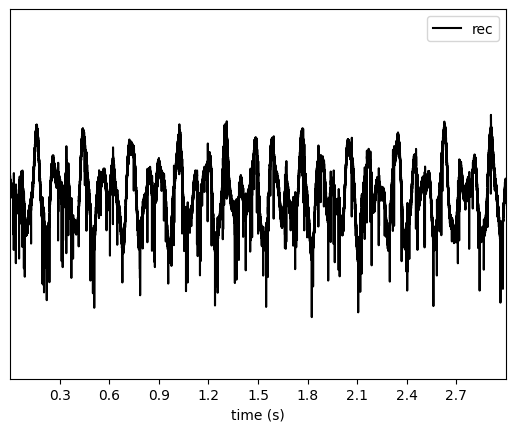
Let’s visualize a short segment of the signal
sw.plot_traces(recording_with_lfp, time_range=[0, 3])
<spikeinterface.widgets.traces.TracesWidget at 0x7e3911dfdfd0>
2. Filtering with low cutoff frequencies: the problem
Now let’s try to extract LFPs using a bandpass filter with a low highpass cutoff (1 Hz). This will demonstrate a common issue.
# Try to filter with 1 Hz highpass
try:
    recording_lfp_1hz = spre.bandpass_filter(recording_with_lfp, freq_min=1.0, freq_max=300.0)
    print("Filtering succeeded!")
except Exception as e:
    print(f"Error message:\n{str(e)}")
Error message:
The freq_min (1.0 Hz) is too low and may cause artifacts during chunk processing. You can set 'ignore_low_freq_error=True' to bypass this error, but make sure you understand the implications. It is recommended to use large chunks when processing/saving your filtered recording to minimize IO overhead.Refer to this documentation on LFP filtering and chunking artifacts for more details: https://spikeinterface.readthedocs.io/en/stable/how-to/extracting_lfps.html.
Why does this fail?
The error occurs because by default in SpikeInterface when highpass filtering below 100 Hz. Filters with very low cutoff frequencies have long impulse responses, which require larger margins to avoid edge artifacts between chunks.
The filter length (and required margin) scales inversely with the highpass frequency. A 1 Hz highpass filter requires a margin of several seconds, while a 300 Hz highpass (for spike extraction) only needs a few milliseconds.
3. Understanding chunking and margins
SpikeInterface processes recordings in chunks to handle large datasets efficiently. Each chunk needs a “margin” (extra samples at the edges) to avoid edge artifacts when filtering. Let’s demonstrate this by saving the filtered data with different chunking strategies.
This error is to inform the user that extra care should be used when dealing with LFP signals!
We can ignore this error, but let’s make sure we understand what it’s happening.
# We can ignore this error, but let's see what is happening
recording_filt = spre.bandpass_filter(recording_with_lfp, freq_min=1.0, freq_max=300.0, ignore_low_freq_error=True)
When retrieving traces, extra samples will be retrieved at the left and
right edges. By default, the filter function will set a margin to 5x the
sampling period associated to freq_min. So for a 1 Hz cutoff
frequency, the margin will be 5 seconds!
margin_in_s = recording_filt.margin_samples / recording_lfp.sampling_frequency
print(f"Margin: {margin_in_s} s")
Margin: 5.0 s
This effectively means that if we plot 1-s snippet of traces, a total of
11 s will actually be read and filtered. Note that the margin can be
overridden with the margin_ms argument, but we do not recommend
changing it.
sw.plot_traces(recording_filt, time_range=[20, 21])
/home/alessio/Documents/Codes/spike_sorting/spikeinterface/spikeinterface/src/spikeinterface/preprocessing/filter.py:169: UserWarning: The margin size (150000 samples) is more than 20% of the chunk size 30000 samples. This may lead to performance bottlenecks when chunking. Consider increasing the chunk size to minimize margin overhead.
  warnings.warn(
<spikeinterface.widgets.traces.TracesWidget at 0x7e3911c882d0>
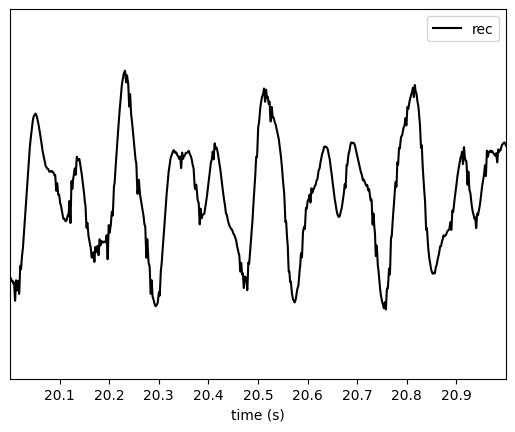
A warning tells us that what we are doing is not optimized, since in order to get the requested traces the marging “overhead” is very large.
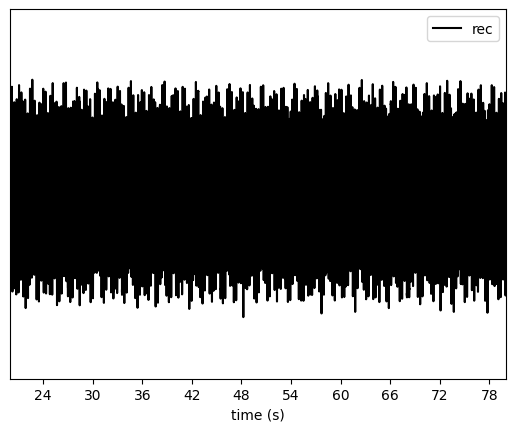
If we ask or plot longer snippets, the warning is not displayed.
sw.plot_traces(recording_filt, time_range=[20, 80])
<spikeinterface.widgets.traces.TracesWidget at 0x7e3911cab750>
4. Quantification and visualization the artifacts
Let’s extract the traces and visualize the differences between chunking strategies. We’ll focus on the chunk boundaries where artifacts appear.
margins_ms = [100, 1000, 5000]
chunk_durations = ["1s", "10s", "30s"]
The best we can do is to save the full recording in one chunk. This will cause no artifacts and chunking effects, but in practice it’s not possible due to the duration and number of channels of most setups.
Since in this toy case we have a single channel 5-min recording, we can use this as “optimal”.
recording_optimal = recording_filt.save(format="memory", chunk_duration="1000s")
write_memory_recording (no parallelization): 0%| | 0/1 [00:00<?, ?it/s]
recording_optimal
Channel IDs
- ['0']
Annotations
- is_filtered : True
Properties
Now we can do the same with our various options:
recordings_chunked = {}

for margin_ms in margins_ms:
    for chunk_duration in chunk_durations:
        print(f"Margin ms: {margin_ms} - Chunk duration: {chunk_duration}")
        t_start = time.perf_counter()
        recording_chunk = spre.bandpass_filter(
            recording_with_lfp,
            freq_min=1.0,
            freq_max=300.0,
            margin_ms=margin_ms,
            ignore_low_freq_error=True
        )
        recording_chunk = recording_chunk.save(
            format="memory",
            chunk_duration=chunk_duration,
            verbose=False,
        )
        t_stop = time.perf_counter()
        result_dict = {
            "recording": recording_chunk,
            "time": t_stop - t_start
        }
        recordings_chunked[(margin_ms, chunk_duration)] = result_dict
Margin ms: 100 - Chunk duration: 1s
/home/alessio/Documents/Codes/spike_sorting/spikeinterface/spikeinterface/src/spikeinterface/preprocessing/filter.py:453: UserWarning: The provided margin_ms (100 ms) is smaller than the recommended margin for the given freq_min (1.0 Hz). This may lead to artifacts at the edges of chunks during processing. Consider increasing the margin_ms to at least 5000.0 ms.
  warnings.warn(
write_memory_recording (no parallelization): 0%| | 0/300 [00:00<?, ?it/s]
Margin ms: 100 - Chunk duration: 10s
write_memory_recording (no parallelization): 0%| | 0/30 [00:00<?, ?it/s]
Margin ms: 100 - Chunk duration: 30s
write_memory_recording (no parallelization): 0%| | 0/10 [00:00<?, ?it/s]
Margin ms: 1000 - Chunk duration: 1s
/home/alessio/Documents/Codes/spike_sorting/spikeinterface/spikeinterface/src/spikeinterface/preprocessing/filter.py:453: UserWarning: The provided margin_ms (1000 ms) is smaller than the recommended margin for the given freq_min (1.0 Hz). This may lead to artifacts at the edges of chunks during processing. Consider increasing the margin_ms to at least 5000.0 ms.
  warnings.warn(
write_memory_recording (no parallelization): 0%| | 0/300 [00:00<?, ?it/s]
/home/alessio/Documents/Codes/spike_sorting/spikeinterface/spikeinterface/src/spikeinterface/preprocessing/filter.py:169: UserWarning: The margin size (30000 samples) is more than 20% of the chunk size 30000 samples. This may lead to performance bottlenecks when chunking. Consider increasing the chunk size to minimize margin overhead.
  warnings.warn(
Margin ms: 1000 - Chunk duration: 10s
write_memory_recording (no parallelization): 0%| | 0/30 [00:00<?, ?it/s]
Margin ms: 1000 - Chunk duration: 30s
write_memory_recording (no parallelization): 0%| | 0/10 [00:00<?, ?it/s]
Margin ms: 5000 - Chunk duration: 1s
write_memory_recording (no parallelization): 0%| | 0/300 [00:00<?, ?it/s]
Margin ms: 5000 - Chunk duration: 10s
write_memory_recording (no parallelization): 0%| | 0/30 [00:00<?, ?it/s]
/home/alessio/Documents/Codes/spike_sorting/spikeinterface/spikeinterface/src/spikeinterface/preprocessing/filter.py:169: UserWarning: The margin size (150000 samples) is more than 20% of the chunk size 300000 samples. This may lead to performance bottlenecks when chunking. Consider increasing the chunk size to minimize margin overhead.
  warnings.warn(
Margin ms: 5000 - Chunk duration: 30s
write_memory_recording (no parallelization): 0%| | 0/10 [00:00<?, ?it/s]
Let’s visualize the error for the “10s” chunks and different margins, centered around 30s (which is a chunk edge):
fig, ax = plt.subplots(figsize=(10, 5))
trace_plotted = False
for recording_key, recording_dict in recordings_chunked.items():
    recording_chunk = recording_dict["recording"]
    margin, chunk = recording_key
    start_frame = int(25 * recording_optimal.sampling_frequency)
    end_frame = int(35 * recording_optimal.sampling_frequency)
    traces_opt = recording_optimal.get_traces(start_frame=start_frame, end_frame=end_frame)
    if not trace_plotted:
        ax.plot(traces_opt, color="grey", label="traces", alpha=0.5)
        trace_plotted = True
    if chunk != "10s":
        continue
    diff = recording_optimal - recording_chunk
    traces_diff = diff.get_traces(start_frame=start_frame, end_frame=end_frame)
    ax.plot(traces_diff, label=recording_key)

ax.legend()
/tmp/ipykernel_141767/3554765238.py:16: MatplotlibDeprecationWarning: Passing label as a length 2 sequence when plotting a single dataset is deprecated in Matplotlib 3.9 and will error in 3.11.  To keep the current behavior, cast the sequence to string before passing.
  ax.plot(traces_diff, label=recording_key)
<matplotlib.legend.Legend at 0x7e3909083ed0>
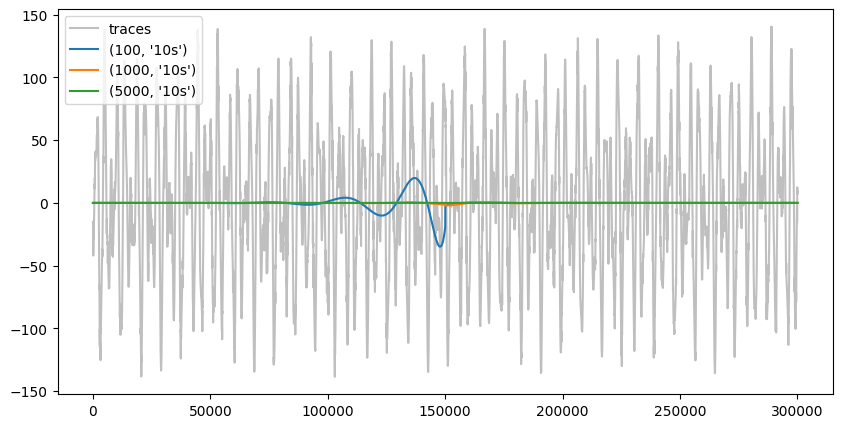
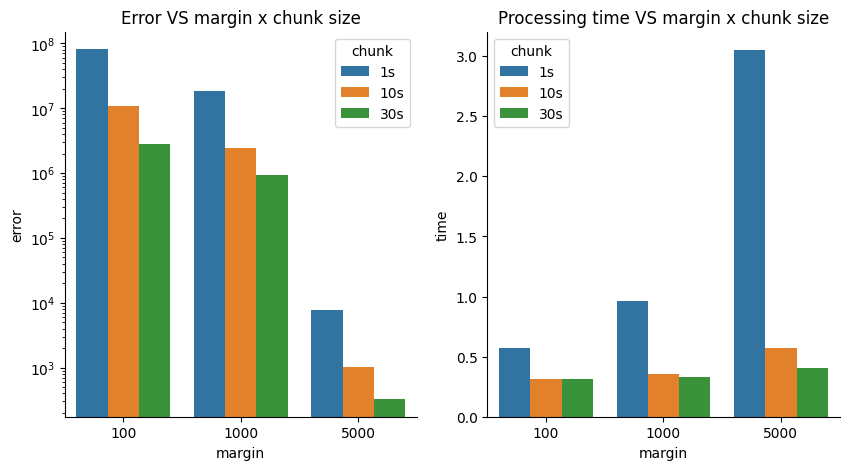
For smaller chunk sizes, these artifact will happen more often. In addition, the margin “overhead” will make processing slower. Let’s quantify these concepts by computing the overall absolute error with respect to the optimal case and processing time.
trace_plotted = False
traces_optimal = recording_optimal.get_traces()
data = {"margin": [], "chunk": [], "error": [], "time": []}
for recording_key, recording_dict in recordings_chunked.items():
    recording_chunk = recording_dict["recording"]
    time = recording_dict["time"]
    margin, chunk = recording_key
    traces_chunk = recording_chunk.get_traces()
    error = np.sum(np.abs(traces_optimal - traces_chunk))
    data["margin"].append(margin)
    data["chunk"].append(chunk)
    data["error"].append(error)
    data["time"].append(time)

df = pd.DataFrame(data=data)
fig, axs = plt.subplots(ncols=2, figsize=(10, 5))
sns.barplot(data=data, x="margin", y="error", hue="chunk", ax=axs[0])
axs[0].set_yscale("log")
sns.barplot(data=data, x="margin", y="time", hue="chunk", ax=axs[1])
axs[0].set_title("Error VS margin x chunk size")
axs[1].set_title("Processing time VS margin x chunk size")


sns.despine(fig)
4. Summary
Low-frequency filters require special care: Filters with low cutoff frequencies (< 10 Hz) have long impulse responses that require large margins to avoid edge artifacts.
Chunking artifacts are real: When processing data in chunks, insufficient margins lead to visible discontinuities and errors at chunk boundaries.
The solution: large chunks and large margins: For LFP extraction (1-300 Hz), use:
Chunk size: 30-60 seconds
Margin size: 5 seconds (for 1 Hz highpass) (use defaults!)
This is less memory-efficient but more accurate
Downsample after filtering: After bandpass filtering, downsample to reduce data size (e.g., to 1-2.5 kHz for 300 Hz max frequency).
Trade-offs: There’s always a trade-off between computational efficiency (smaller chunks, less memory) and accuracy (larger chunks, fewer artifacts). For LFP analysis, accuracy should take priority.
When processing your own data: - If you have memory constraints, use the largest chunk size your system can handle - Always verify your filtering parameters on a small test segment first - Consider the lowest frequency component you want to preserve when setting margins - Save the processed LFP data to disk to avoid recomputing